SparkFun IoT RedBoard Combines ESP32-P4 Processing with ESP32-C5 Wireless
SparkFun’s $49.95 RedBoard pairs a 400 MHz ESP32-P4 with an ESP32-C5, MIPI connectors and open KiCad files for embedded and HMI projects.
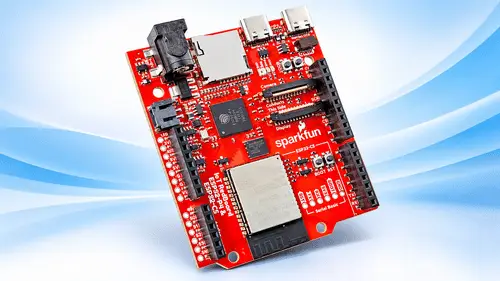
SparkFun’s IoT RedBoard brings application processing and wireless connectivity together through two Espressif chips: the ESP32-P4 and ESP32-C5. The split gives the board a 400 MHz processor for tasks such as image and sound handling, while a separate chip manages wireless links. For embedded and human-machine interface projects, that arrangement offers a development platform with camera and display connections, familiar expansion headers and design files that can be inspected or adapted.

Processing and radio are assigned to separate chips
The ESP32-P4 runs at 400 MHz and handles application work, including image and audio processing. The ESP32-C5 takes care of wireless communication, with dual-band Wi-Fi 6, 5 GHz operation, Bluetooth 5 LE and Zigbee listed among its capabilities. Keeping those functions on separate processors gives a project distinct compute and connectivity resources, though the supplied information doesn’t specify how tasks are divided in a particular application or give performance figures for image or audio workloads.

Memory on the board comprises 32MB of PSRAM and 16 MB of flash. A microSD card adds another storage option for projects that need removable capacity. The article doesn’t state the card’s supported capacity or speed, so those details will need to be checked against the board documentation before a design depends on a particular card.
For an HMI prototype, the mix points toward a board that can connect processing, a camera or display, and wireless communication on one development platform. The practical fit will depend on the requirements of the display and camera, the project’s memory use and the software support available for each interface. No display resolution, camera specification, throughput figure or power consumption is given here.
Connectors cover common prototype interfaces
MIPI connectors provide the board’s camera and display interfaces. Two USB-C ports serve different development roles: one is for serial and JTAG programming, while the other provides high-speed USB OTG. Separating these connections can make it easier to keep a debugging or programming link available while a project uses USB OTG, subject to the board’s implementation and software configuration.

The board also includes a Qwiic connector and RedBoard/R3 expansion headers. Those options give developers routes to connect compatible peripherals and reuse existing add-on hardware. A JST connector supports a single-cell LiPo battery; onboard charging and battery monitoring are included. The available description doesn’t give charging current, battery capacity limits or monitoring accuracy, so those figures matter for designs with specific runtime or power-management targets.

Connector availability is useful early in a prototype, but it doesn’t by itself establish electrical compatibility with every camera, display, add-on or battery. Developers will need to consult the board’s pin assignments and component documentation when selecting peripherals or planning a custom carrier.
Open design files and software support
SparkFun provides KiCad schematic and PCB design files in the project repository. Those files let developers follow component connections and inspect the physical board layout. They can also serve as a starting point for hardware changes, although a modified design still needs its own checks for routing, power, signal integrity and manufacturing constraints.
The repository includes Arduino board support files, installation scripts and patches for the ESP32-C5 wireless interface. The board ships with MicroPython and can also be used with Espressif’s ESP-IDF and the Arduino IDE. That gives teams a choice of software environments, but wireless setup has a specific compatibility caveat: the standard Arduino ESP32 Core version 3.3.12 does not yet natively support the ESP32-C5 co-processor on this board. SparkFun supplies a temporary patch while upstream support is being developed.
That software detail is likely to affect how quickly a project can move from bring-up to application work. Developers choosing Arduino should account for the patch in their setup and build process, while teams using MicroPython or ESP-IDF should check the repository instructions for the relevant board and wireless configuration. The supplied information doesn’t describe feature parity across the three environments.
Two board configurations and listed price
SparkFun lists the ESP32-P4 and ESP32-C5 Wi-Fi/BLE version at US$49.95. A separate PoE variant is also available; it uses wired Ethernet instead of the wireless companion. That gives developers a choice between a wireless configuration and a wired-network option, though the available details don’t specify the PoE variant’s processor configuration, power requirements or Ethernet performance.
The RedBoard’s appeal is its combination of application processing, wireless options, MIPI interfaces and accessible design files in one platform. For a prototype that needs those features, the next checks are concrete: confirm peripheral compatibility, review the board files, and account for the ESP32-C5 patch if using Arduino. Those details will determine how directly the board fits a project’s hardware and development workflow.
 AMD Venice Uses 2.5D Packaging to Feed More Bandwidth Into EPYC Zen 6
 CNC Controller Board Design: Interfaces, PCB Specs and Assembly Testing
 Xometry Q3 2026 Revenue Reaches $252.4 Million as Marketplace Margins Rise