Exact 3D Video Turns CAD Files Into Narrated Explainer Videos
Exact 3D Video's English web service turns STEP, IGES, STL and drawing files into narrated 1080p explainer videos built from 3D scenes, not pixel generation.
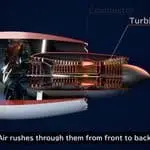
Most product animation still starts with someone opening a 3D package, rebuilding a model that already exists in a CAD tool, and spending days on lighting and timing. A Japan-based web service, Exact 3D Video, is pitching a shortcut. Its CAD explainer has now launched in English, and it's aimed at manufacturers and product teams that want narrated 3D videos from drawings and technical documents without in-house modelling or editing skills.

What goes in
The workflow starts in a chat interface. Users describe the video they want, then upload reference material. The service accepts PDF documents, images, technical drawings and CAD data in STEP, IGES, STL, OBJ and 3MF formats. That mix matters more than it first appears. STEP and IGES are the long-standing neutral exchange formats for solid geometry, so they carry shape information that a downstream tool can work with. STL is a triangle mesh, which is good for display but holds no feature tree or design intent. OBJ is a similar mesh-and-material format, and 3MF is the newer format built for additive manufacturing that can also carry units and colour. Expect the cleanest results from the solid-model formats, with meshes handled as visual geometry rather than dimensioned parts.
How the video gets built
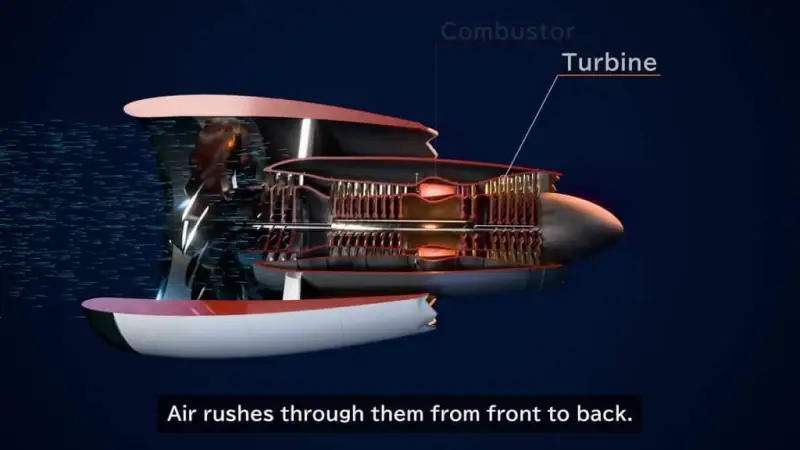
The pipeline has three visible stages, and the middle one is where the value sits. First, the system produces an animated storyboard: sketches paired with a script. Second, each scene is modelled in 3D and animated. Third, the result is exported as a 1080p MP4 with AI-generated narration and subtitles.

Between the storyboard and the final render, the user gets a review loop. They can view the storyboard, step through individual scenes and request changes through the same chat. Only then is the final video generated. That review step is the part I'd want to see tested on real engineering content, because a storyboard can look right while a single scene quietly misplaces a feature or mislabels a dimension.
Why 3D scenes instead of pixel generation
The company's central technical claim is that the animation is built from 3D scenes rather than generated pixel by pixel. That distinction is easy to skim past. Image and video generators tend to struggle with precise geometry, small text and numeric values, because nothing in the output is anchored to a measurable model. A 3D scene keeps the shape, the labels and the data as objects that can be positioned, scaled and re-rendered from any camera angle.

Exact 3D Video says this lets complex shapes, text and numeric data display accurately, and that geometry from CAD files can be brought directly into the animation. The claim is credible in principle for the parts that come from the source file. It's less clear how the system handles the parts the model has to infer, such as a callout that a drawing implies but doesn't spell out. Teams in this position typically check those generated elements against the source drawing before anything goes external, and that habit is worth keeping here.
Where electronics teams might use it
The company points to electronics as a natural fit. Its examples include transistor switching, CPU instruction processing and semiconductor manufacturing, which are all processes that are easier to explain with motion than with a static diagram. The stated uses are product introductions, training material for distributors and technical demonstrations.
That last category is where I'd expect the most traction. Distributor and field training usually needs a quick, consistent explainer for a product family, and re-cutting a video every time a revision lands is expensive. A pipeline that starts from the drawing package could shorten that cycle, provided revision control stays tight. Trade show videos are the other use the company names. For those, a short narrated loop built from the same CAD data as the product can be produced without pulling a motion designer onto the project.
Length, cost and what to check first
Videos can run from 15 seconds to 10 minutes, and the service provides a cost estimate before each generation. That up-front estimate is a useful feature for teams that want to control spending on iterations, since every revision round is a new generation.

Before committing a product's documentation to a tool like this, I'd test three things. First, confirm that the imported geometry matches the source in scale, orientation and assembly structure, especially for mesh-based files. Second, check every number and label on screen against the drawing, since the narration and subtitles are AI-generated and need the same engineering review as any other technical document. Third, make sure the final video shows only what the product actually does, not what a generated scene assumed it does. A polished animation of a wrong mechanism is a worse outcome than no animation at all.
The bigger question is whether tools like this become a standard step between a finished CAD model and a sales or training deck. If the geometry stays faithful and the review loop catches errors early, the cost of making a motion explainer drops sharply, and that changes how small hardware teams plan their documentation. Watch for how the service handles revisions to a single drawing, because that's where most real projects will spend their time.
Click here for Exact 3D Video to see the service directly.
 ProMateria Opens Metal Additive Plant, Starting With GMH Spare Parts
 Q.ANT's Photonic NPU Runs Fourier Transforms in Light for AI Workloads
 SiTime's FemtoClock 4 and VersaClock 8 Target AI Data Centre Timing