XJTAG 4.4 Adds Direct Voltage Probing and Selective PCB Tests
XJProbe adds direct voltage measurement to XJTAG 4.4, while saved test presets and workflow updates help engineers focus PCB debugging.

XJTAG 4.4 adds a direct voltage measurement path to its board test workflow, giving engineers another way to investigate printed circuit board faults alongside existing pin control. The new XJProbe connects through compatible XJTAG hardware, while software changes let users run selected tests and keep device datasheets close to project work.

Voltage measurements within the XJTAG workflow
XJTAG says XJProbe is a test probe for measuring voltage directly on a PCB. It connects to an XJLink-PF20 or XJLink-PF40 JTAG controller and sits between the controller and the board under test. Used with XJAnalyser, it brings voltage readings into the XJTAG environment, where engineers already use pin control features.

That integration may help when a board’s symptoms call for checking a voltage at a particular point rather than relying only on digital pin control. A reading can give the engineer another piece of evidence while narrowing down a fault. The announcement doesn’t specify the probe’s measurement range, accuracy, resolution, supported probe tips, or input impedance, so those details need to be checked against XJTAG’s product documentation before planning a measurement task.
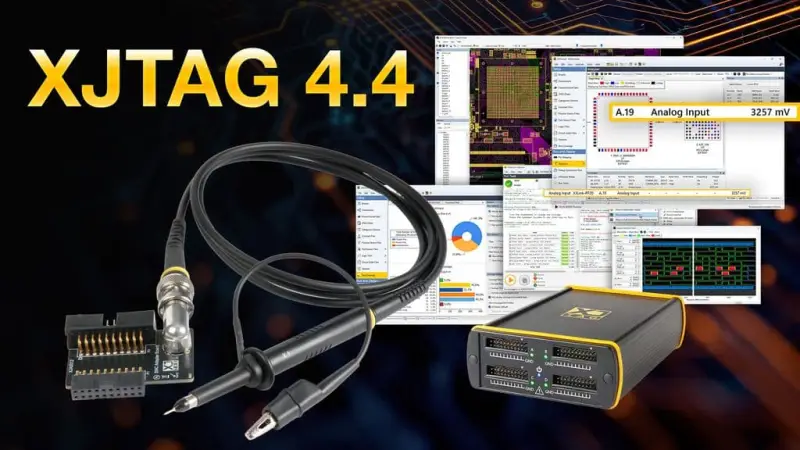
The connection arrangement also makes compatibility a practical first check: the stated controller options are the XJLink-PF20 and XJLink-PF40. The software release notes describe the probe as part of version 4.4, but provide no information here about board access requirements, whether measurements can be automated in a test sequence, or any limits on probing powered boards.
Run the relevant part of a test program
Version 4.4 adds test list presets that users can create and save. These presets can define a subset of a board’s test program, allowing an engineer to repeat selected checks without running the full sequence every time. For iterative debugging, that can reduce the work between a design change, a repair, or a newly observed fault and the next useful result.

Selective execution is most useful when the test program is broader than the question at hand. An engineer investigating one connection or device can choose the relevant portion, then return to the full program when a wider check is needed. Saved presets also provide a repeatable way to select those checks across troubleshooting sessions. XJTAG does not state how presets are managed across projects or teams, or whether they can be versioned alongside other test assets.
Connection editing and datasheet access
The Connections window has also been revised. Fields can be prefilled, entries can be edited inline, filtering is more efficient, and connections can be imported. Together, these changes target the repetitive work of creating and maintaining board connection data. Inline editing keeps corrections near the relevant entry, while filtering and import support larger connection sets.
XJDeveloper adds datasheet search within the software. Engineers can save datasheets as links in a project, and those links are available when the corresponding device is encountered in the software. Keeping a reference at the point where a component appears can shorten the path from a test result to the device’s pinout or electrical characteristics. The release description does not identify which datasheet repositories are searched or explain how links are updated if a document moves.
Check chain results are condensed by default
For check chain testing, detailed result data now appears under a single header by default. Engineers can expand the section when they need the underlying details for analysis. This changes the initial presentation of results rather than the stated test capability: the overview is less crowded, with diagnostic information still available on demand.
Taken together, the changes in XJTAG 4.4 address several points in the board debug cycle: taking a direct voltage reading, repeating a focused subset of checks, editing connection information, finding component documentation, and opening detailed test results when needed. The most useful next step for teams evaluating the release is to confirm XJProbe’s electrical specifications and supported measurement conditions, then assess whether the saved test presets fit their existing board test programs.
 Nuvoton MA35 Platform Adds Redfish Remote Management for Industrial Edge Devices
 TVS Diodes Target Transient Protection in High-Voltage DC Systems
 YINCAE UF 120HA-10 Underfill Targets Flux-Cleaning Removal in Semiconductor Packaging